
.png)
How to measure dental marketing ROI: 5 steps to understand what’s working (and what’s not)
The average dental practice spends about 5% of revenue on marketing, and most don’t know which dollars are actually working for them [1, 2, 3]. The math behind measuring dental marketing ROI isn’t complicated, but the setup can be daunting.
Why should you care what we have to say? As the only marketplace built exclusively for connecting dental patients with dentists, dental patient marketing is core to what we do. We spend $13.5 million per year on dental patient acquisition, we work with 2,500+ dentists, and we've had over 400,000 appointments completed through ourplatform.
What we’ve learned: you don’t need a perfect system to get started. You need 5 steps, 30 days, and a willingness to look at what your data is telling you.
- What is dental Marketing ROI? Marketing ROI for a dental practice is the lifetime revenue from a new patient divided by what you spent to acquire that patient. The American Dental Association considers 3:1 to 5:1 the healthy range for dental marketing [4].

In this guide
- The 5-step framework: how to measure dental marketing ROI for every channel you run.
- A 30-day plan to understand your approximate marketing ROI by channel.
- A dental ROI calculator that takes your numbers and outputs your real ROI by channel (using benchmarks where you don’t have your own data yet). Read the guide or jump right into the accompanying calculator:
Calculate your marketing ROI in 5 mins

Key takeaways
- To understand where your patients are coming from, start simple and upgrade over time. A good directional estimate, captured at intake, is enough to start making better decisions.
- Operational costs (rent, wages, dentist time) don’t count as marketing spend. They’re a practice profitability question, not a marketing channel question. Most of these costs are fixed, even if a chair is empty.
- Channels charge for different things (clicks, leads, bookings, completed visits), so to compare them fairly you need to calculate total cost per patient who actually showed up.
- Patient lifetime value is the total revenue one patient generates over their time with your practice. Many dentists simplify this by asking whether they break even on the first appointment, but that logic leaves money on the table. Practices with strong retention see lifetime value far exceed what any single visit brings in.
- The ROI benchmark to measure against is 3:1 to 5:1, per the American Dental Association [4]. Every channel you run should clear 3:1 over a patient’s lifetime, or it should be cut, optimized, or replaced.
Step 1: Know where your patients are coming from
Clicks and impressions from a marketing campaign provide a glimpse of what’s resonating, but they don’t tell you the full story. Those numbers count people who saw or interacted with your ad, not people who became real patients. The metric that actually drives ROI is the number of customers who book (and actually show up). Before you touch any math, you need a basic system for capturing where each new patient came from.
Level 1: The simplest setup (start here)
Ask “How did you hear about us?” at every touchpoint where a new patient comes in:
- While booking on the phone
- On your online booking or request form
- In your email reply
- At check-in if the source wasn’t captured earlier
The earlier you catch it the better, because patients forget by the time they arrive in your chair.
When the patient isn’t sure, prompt them with the main channels you actually run. The major ones:
- Google (covers both Google Ads and your Google Business Profile/SEO)
- Insurance directory or benefits portal
- Friend/Family Referral
- Opencare
- Zocdoc
- Healthgrades
- Facebook/Instagram (covers both Ads and Organic Social)
- Direct Mail
- Walk-by
Log the answer in your PMS for every new patient. Most PMS systems have a “Referred By” or “Marketing Source” field. Configure it as a dropdown (not free text) using the relevant channels from the list above, so your reporting is clean. Look at the data weekly; even rough numbers tell you which channels are pulling weight.
For patients booking through Opencare, Zocdoc, or similar platforms, the source is already captured by the platform and should sync directly to the patient record in your PMS. Otherwise, you can see those patients in the platforms themselves.
Level 2: Add call tracking numbers (the upgrade)
Many new dental patients still book by phone, so a unique tracked phone number per channel is the single highest-leverage upgrade you can make. It also gives you the cleanest way to separate Google Ads patients from Google Organic patients without changing how patients find you.
Setup time: half a day. Cost: ~$10 to $30/month for a call tracking tool like CallRail or CallTrackingMetrics. Each tool gives you a different phone number per channel and all numbers route to your real practice line. The tool logs which number was called.
If you already use Weave (a common VOIP system in dental practices), call tracking works alongside it. Weave handles the call routing, voicemail, and texting. The call tracking tool sits in front of Weave, tagging each incoming call with its marketing source before it routes through. The two complement each other; you don’t have to replace Weave to add call tracking.
Channels that need a tracked number:
- Google Business Profile, Google Ads, Meta Ads (Facebook/Instagram), Healthgrades, insurance directory or benefits portal, direct mail, email campaigns (if you include a phone number and a booking link), and your website.
- Note: for Google Business Profile and Google Ads you should also ask the patient at intake, as they might have been triggered to book by another source before searching you on Google (eg. friends or family).
Channels that don’t need a tracked number:
- Opencare and Zocdoc. Booking happens inside these platforms, so the source is already captured there and automatically synced to your PMS.
- Friend/family referrals, organic social posts (Facebook/Instagram), and walk-bys. These channels generally don’t drive trackable calls.
How your front desk uses this data: Most call tracking tools display the source on the incoming call itself, as a screen pop or a label next to the number ringing. That means the receptionist can see “Google Ads” or “Healthgrades” the moment the phone rings, and they can log the source in the patient record while they’re booking the appointment, in real time.
If your tool doesn’t surface the source on the live call, you can check the call tracker dashboard monthly: pull the call tracking report, cross-reference it with the new patients from the same month, and update any missing source fields. Blend that with the “How did you hear about us?” data from intake to get a complete picture of where every new patient came from.
Notes
- Digital tracking: You can go further with digital tracking using UTM tags on your ad links, hidden form fields on your booking forms, and Reserve with Google attribution through your scheduling provider. That gets more technical and is outside the scope of this guide.
- Phone calls vs website form fills: When you have the choice, an inbound phone call from a paid channel converts to a booked appointment at several times the rate of a website form fill [5]. If your ad gives a clear option between “call now” and “request an appointment,” directing patients to call (with a tracked number) should produce better ROI. This applies primarily to Google Ads and Meta Ads.
- Attribution: The system above captures “last-touch attribution”. It credits the channel that drove the action (the call or the form fill), not every channel that influenced the patient along the way. A patient might hear about you from a friend, then see your Instagram ad. Last-touch credits Instagram alone, even though the referral contributed as well. Last-touch is the simplest practical system, and it’s good enough to make confident channel decisions.
Try the calculator
Want to cut to the chase? Use the Opencare dental marketing ROI calculator. Input your numbers if you have them. If not, we’ll plug in benchmarks and do the math for you.
Step 2: Gather what you’re spending on marketing
The next step is gathering what you spent to get your patients. The core principle: marketing math is about whether a marketing dollar is paying off. If a cost is one you’d pay whether you ran marketing or not, it doesn’t belong here.
The empty chair reframe (why operational costs don’t belong)
The most common mistake we hear: practices fold operational costs (rent, wages, dentist time) into their marketing math, decide every channel looks unprofitable, and cut marketing entirely. Here’s why that’s the wrong frame: your dental and hygiene team, rent, equipment, insurance, and utilities get paid whether the chair is full or not. Those are fixed costs. The marginal cost of one more patient in an otherwise-empty chair is supplies and consumables, a fraction of what the visit generates in revenue (and for complex treatments that need more supplies, that’s already priced in).
Which means a new patient filling an otherwise-empty chair is almost pure profit, no matter how they got there. The “empty chair” is your real cost. Filling it with the right patient is your real return. This is also why pay-per-visit models like Opencare are easier to evaluate: you only pay for patients that actually showed up.
Note: fixed costs do increase when you add a hygienist, expand the schedule, or open another practice. Those decisions get unlocked through sustained patient growth, but they are a separate decision from marketing ROI. For now, treat your current capacity as the constraint.
What goes in your marketing spend
Pull last quarter’s marketing spend into a spreadsheet. For this exercise we’ll focus on patient acquisition channels (channels that drive bookings directly). Categories we’re excluding here are social media (posting and management) and reputation management (review software, monitoring, and responses).
- Digital ads: invoices from Google Ads, Meta Ads.
- Agencies, consultants: monthly retainer, management fees, the ad spend they manage on your behalf.
- Marketing staff (part-time or full-time): staff wages, the ad spend they manage on your behalf.
- Patient acquisition platforms: Opencare monthly subscription plus per-completed-visit fees.
- Directory listings: Zocdoc and Healthgrades subscriptions plus per-booking fees where applicable.
- SEO (Google Business Profile/Google Organic, Website): anything you pay to improve your organic Google ranking and maintain your website: SEO services, website updates and maintenance, and the cost of maintaining your Google Business Profile if you pay someone for that. If you handle SEO in-house and don’t pay anyone, the cost here is $0.
- Direct mail: invoices from your direct mail service and anything you spent on design.
What stays out
- Dentist and hygienist wages.
- Rent, utilities, equipment.
- Front-desk time on patient calls (this is service, not marketing).
Step 3: Calculate dental patient acquisition cost, by channel
Different channels charge for different things: clicks, leads, bookings, completed visits. To compare them apples to apples, you need to calculate patient acquisition cost for each channel. That is, the cost per patient who actually showed up.
For each channel, the underlying formula is the same:

We recommend running this exercise on your previous quarter’s data. This will smooth out any bumps from seasonality and allow booked appointments time to actually be completed.
This method assumes you already had patient source tracking in place when last quarter started, so you can use real data. If you don’t have source tracking yet, you can still get a directional estimate for each channel using industry benchmarks. We cover that approach in detail in another article: How to calculate dental patient acquisition cost by channel.
Steps:
- From Step 2, have your marketing spend per channel from last quarter ready.
- If you had source tracking in place, export new patient bookings from your PMS for last quarter, including the amount each patient has been billed and the marketing source. Drop any new patient records billed $0 (those aren’t successful appointments yet) and sum the number of successful patients per channel.
- Run the formula for each of your active channels.
Some channels have nuances which we go through below.
Digital Ads: Google Ads, Meta Ads / Agencies, Consultants, or Marketing Staff Members
If these are managed internally, you can use the standard formula. If you have an agency, consultant, or marketing staff member managing these channels, make sure to fold the costs of those resources into the channel calculations.
For example, for agencies:
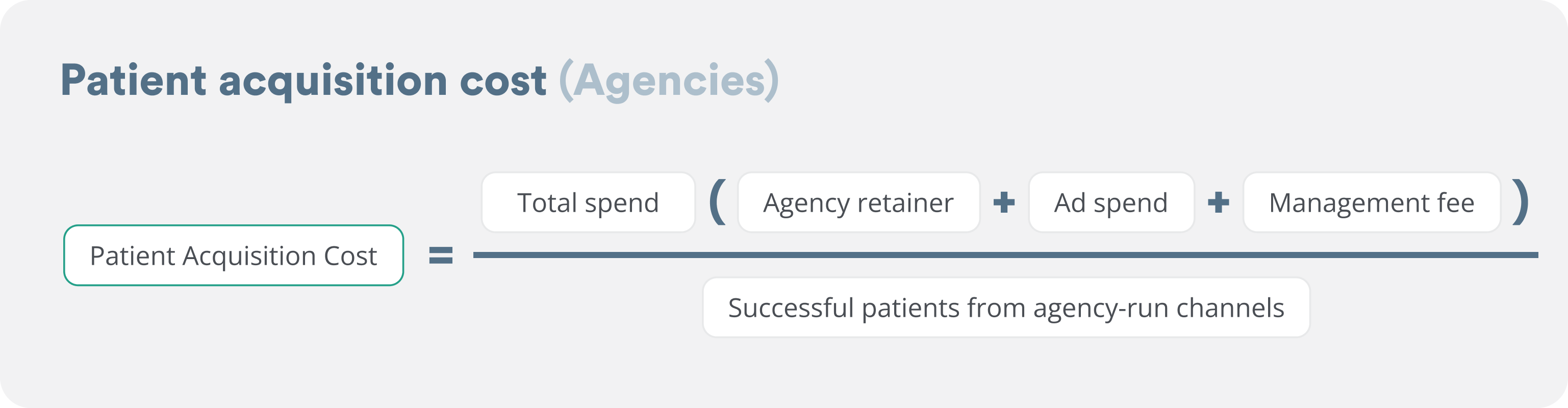
The agency should be managing ROI between channels, so you can look at it on the aggregate level (successful patients brought in by your agency). You can also ask them to calculate the marketing ROI for you, split by channel, with the agency retainer and management fees distributed to each channel proportional to spend on that channel.
Patient acquisition platforms: Opencare
Source tracking isn’t required here. Bookings happen inside Opencare, with the source captured automatically and synced into your PMS through our integration (provided you’re with one of the ~65 PMS tools we integrate with).
Opencare also charges per completed visit, so you don’t pay for no-shows or cancellations. This removes the need to cross-check which appointment requests became real patients.
And the Opencare performance dashboard shows your ROI in real time, based on what your Opencare patients have billed (via your PMS connection) and your contract rates. Which means you can skip this calculation entirely (or run the formula to verify the math yourself).
Pricing varies by region. Book a demo to find out what yours looks like.
Directory listings: Zocdoc, Healthgrades
Source tracking isn’t required for directories either. Zocdoc and Healthgrades capture bookings in their own platforms, so you can pull patient counts from their dashboards (they may sync source info to your PMS as well) and cross-reference with your PMS to confirm who actually showed up.
SEO (Google Business Profile/Google Organic, Website)
If your tracking separates Google Organic from Google Ads, use the standard formula.
If your tracking lumps all “Google” patients together (no separation between Organic and Ads), use a weighted split based on spend:
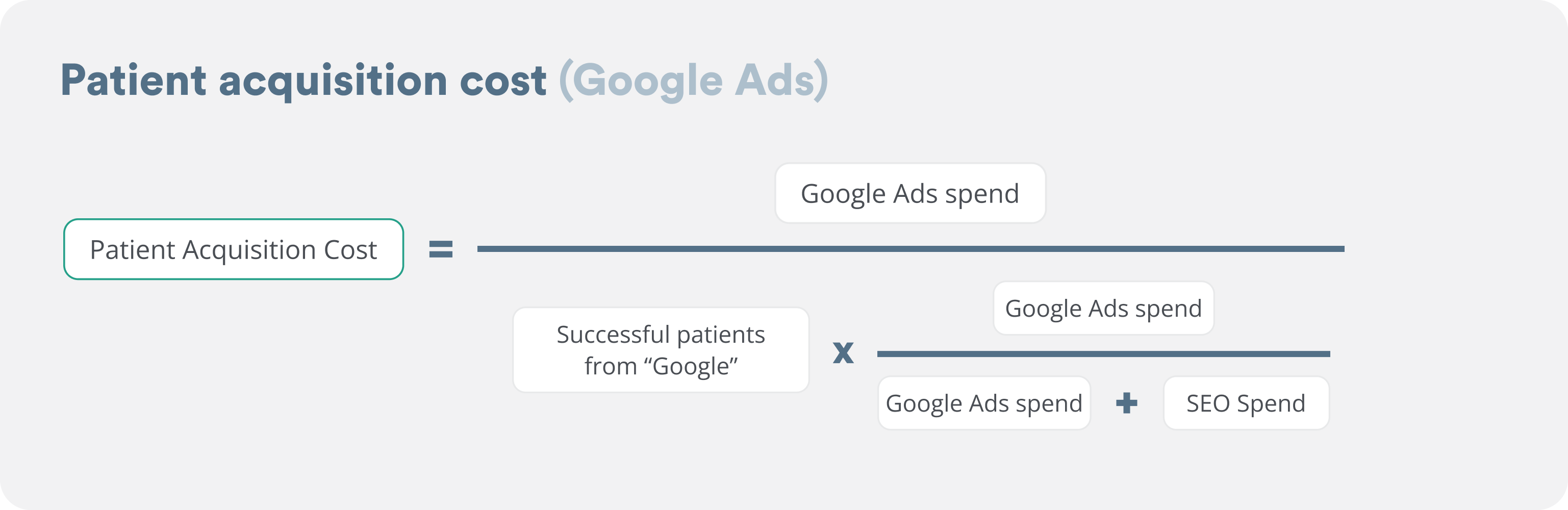
The same formula applies for SEO.
Example of weighted split: Google Ads spend was $9,000 last quarter, SEO/Website spend was $3,000 last quarter (3:1 ratio). You got 20 patients from “Google” last quarter. Allocate 15 patients to Google Ads (75%) and 5 to SEO (25%). Then divide each spend by its allocated patient count.
Step 4: Calculate your average patient lifetime value
A common mistake we see: many dentists try to simplify the ROI math by asking “what production did the patient generate in their first appointment?” That’s tempting, but wrong.
A new patient isn’t just their first visit. They come back for hygiene, recall, and restorative work over years. At Opencare, we typically see patient lifetime value in the $3,000 to $6,000 range for general dental practices, though it varies based on location, retention, and services offered.

Example: $700 average annual revenue per patient × 4 years average retention = $2,800 patient lifetime value
Pull each input from your PMS:
- Average annual revenue per patient (Annual Patient Value or APV): total practice production ÷ number of active patients over the last 12 months. This is a standard KPI in most PMS reporting [6].
- Average retention in years: how long your average patient stays with the practice. If you don’t have this number, 3 to 5 years is a reasonable starting estimate. Industry data shows ~47% of Millennial and Gen X patients switch dentists within 2 to 3 years, and only ~43% of patients stay 5 or more years [7].
Adjusting lifetime value by channel
Once your Step 1 tracking has 12+ months of data, you can split lifetime value by channel directly. Until then, ask your front desk if certain sources tend to produce more or less loyal patients and adjust those channels’ lifetime values by a gut estimate (say +/- 25%).
Notes
- Operating costs don’t belong in this calculation either. As a reminder, when you’re looking at revenue per patient, you shouldn’t subtract the cost of paying your hygienist, your rent, or any other fixed expense. Those exist whether or not you spend on marketing. Marketing ROI is about the revenue you got from that patient relative to the incremental amount you paid to acquire them. Practice profitability (which includes those fixed costs) is a separate question.
- New patients are worth more at the start because they have higher restorative needs. Opencare’s new patients average $455 in first visit production vs the ADA’s industry average production of $256 for any visit [8]. This makes new patients helpful for your short-term revenue outlook.
- However, higher retention is what compounds your marketing ROI over the long term; every patient who comes back is more value out of the same acquisition spend. For more on what drives retention, see our recent study on the Top 5 operational improvements to boost your ratings and retention.
- If you want a more accurate calculation using a cohort-based method (more complex, requires 3 to 6 years of PMS data), see the appendix.
Step 5: Calculate ROI per channel
Finally, we can calculate your ROI per marketing channel.

Fill in the table below for your practice:
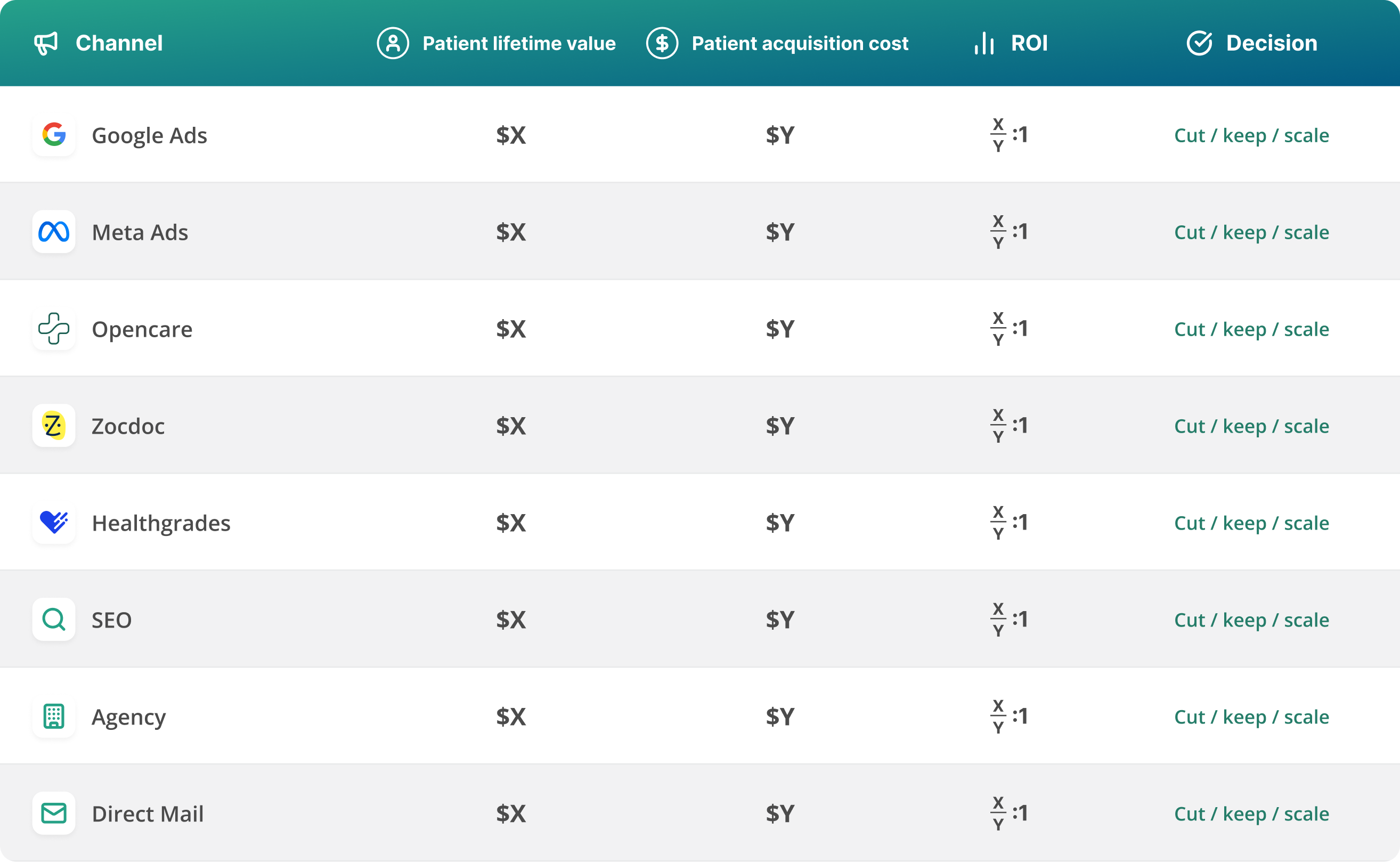
Patient lifetime value should be channel-specific if available; otherwise use the average.
The dental industry standard for a healthy marketing ROI is 3:1. Use this as guidance to evaluate each channel:
- Below 2:1: cut.
- 2:1 to 3:1: investigate. Likely overspending or under-converting.
- 3:1 to 5:1: keep and optimize.
- Above 5:1: spend more. You’re probably under-investing.
Why 3:1? It’s the benchmark the American Dental Association sets for a healthy dental marketing channel [4]. Below 3:1, the channel isn’t returning enough margin to be worth running over the long term.
Why above 5:1 means you’re under-investing. A channel returning 5:1 or higher has so much headroom that you’re leaving growth on the table. Marketing channels eventually saturate. At 5:1, you haven’t hit that ceiling. Spending more and accepting a slight drop (say, from 5:1 to 4:1) still grows your absolute return because total revenue scales faster than your channel’s efficiency drops.
Your 30-day plan
You can run this whole framework in 30 days. Here’s the week-by-week.
Week 1: Track where patients come from
- Add “How did you hear about us?” to every intake touchpoint (phone, online, email, check-in).
- Configure your PMS source field as a dropdown.
- Train the front desk to log it for every new patient.
Week 2: Clean up your spend
- Pull last quarter’s marketing spend into a spreadsheet.
- Strip out operational overhead (rent, wages, equipment).
- Make sure every marketing cost is captured by channel: ad spend, directory subscriptions, platform fees, agency retainers, etc.
Week 3: Compute patient acquisition cost by channel
- Use the source tracking data you’ve collected since Week 1 (a few weeks at this point) as a directional estimate to get successful patients from each channel. As you collect more data over the coming months, your numbers will sharpen.
- For each channel, calculate spend ÷ successful patients.
- Run the directory and platform formulas with your actual data from billing dashboards.
- If you work with an agency, run the agency formula.
- For channels where you didn’t have source tracking last quarter, use the benchmark estimates from our companion post.
Week 4: ROI and decisions
- Calculate your patient lifetime value using the formula in Step 4.
- Fill in the Step 5 table for each channel.
- Apply the cut / keep / scale rules.
Skip the spreadsheet, use the calculator
Use the Opencare dental ROI calculator to run this whole process automatically using your numbers. Plug in your spend and your patient counts (we’ll use benchmarks where you’re missing data) and you’ll get your patient acquisition cost, patient lifetime value, and ROI by channel in about 5 minutes.
Appendix
Step 4 / Method 2: The cohort method (more accurate, calculate from scratch)
If you have clean PMS data going back several years and want a more precise lifetime value number, use the cohort method. It’s more involved than the annual revenue × retention formula in Step 4, but it captures the full lifecycle of a real cohort, including the patients who left and the ones who stayed.
- Identify all new patients acquired ~5 years ago.
- Pull total revenue from those specific patients since they joined your practice.
- Divide that total by the number of patients in the original cohort.
- That’s your average lifetime revenue per acquired patient.
Sources
- Dentx — How Much Should Dentists Spend on Marketing? 2026
- Vizisites — Dental Marketing Budget Blueprint
- The Dental Marketing Company — How Much Should a Dental Practice Spend on Marketing in 2026
- American Dental Association — Calculating Return on Investment
- Invoca — Call Tracking and Conversation Intelligence Statistics (citing BIA/Kelsey research on inbound call vs web lead conversion)
- American Dental Association — Key Performance Indicators (KPIs)
- Etactics — Patient Retention and Churn Rate Statistics
- American Dental Association Health Policy Institute — Dental Practice Research (underlying dataset: Survey of Dental Practice, downloadable XLSX from that page)
Try the dental marketing ROI calculator




Frequently asked questions
What’s a good ROI for dental marketing?
A good dental marketing ROI is 3:1 to 5:1, per the American Dental Association. For every $1 you spend on a channel, you should get back $3 to $5 in lifetime patient revenue. Below 3:1, the channel isn’t covering acquisition cost plus growth. Above 5:1 means you’re probably under-investing and could scale that channel.
How much should a dental practice spend on marketing?
Most dental practices spend about 5% of revenue on marketing, typically $3,000 to $12,000 per month. New or growing practices often spend 8 to 10% to acquire patients faster. Established practices in stable markets spend 3 to 5%. The right number depends on your growth goals.
Is Zocdoc worth it for dentists?
Zocdoc can be worth it, but you need to do the math first. Zocdoc charges an annual licensing fee plus a per-booking fee whether or not the patient shows up. Calculate your true patient acquisition cost by dividing total Zocdoc spend by patients who actually showed up (we recommend doing this for at least 3 months of data). If your ROI clears 3:1, it’s worth keeping.
How do I calculate the lifetime value of a dental patient?
Use this formula: average annual revenue per patient × average retention in years. At Opencare, we typically see dental patient lifetime value in the $3,000 to $6,000 range for general dental practices, though it varies by location, retention, and services offered.
How long does it take for dental marketing to pay off?
First-visit revenue from a new patient can cover acquisition costs if your channels are operating efficiently. Full ROI plays out over multiple years as patients return for hygiene, recall, and restorative work. Judging dental marketing on first-visit revenue alone underestimates the real return significantly.
What’s the average cost to acquire a new dental patient?
The average cost to acquire a new dental patient runs $150 to $500 depending on the channel. For a channel-by-channel breakdown with formulas and benchmarks, see our companion post: How to calculate dental patient acquisition cost by channel (even if you don’t have your source tracking set up yet).